
BRINGING IT ALL TOGETHER

Product Development Process
Improvement &
Refinement


Ideation
Identify problem and its
stakeholders and come
up with solutions
01
Product Design
Develop the main
design and features
of the product before
prototyping.
02
Market Research
Analyze Competitors and
users needs to validate
the product idea.
Testing & Prototyping
Test the initial
product to identify
issues and
improvements.
03
04
05
Iterate based on
feedback from product
testing results.
Developement
The product is
developed.
06
Printable QR Sticker with Unique R-AID ID
“When seconds matter, your R-AID sticker speaks for you.”

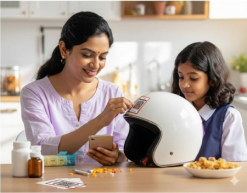


Use of Printable QR Sticker with Unique R-AID ID
Always Accessible → Users can stick it on their wallet, helmet, fridge, car, or medical file, ensuring critical info is never locked in just one device.
Offline Ready → Works even when phones are lost, out of battery, or there’s no internet—QR directly opens cached emergency data.
Universal Recognition → First responders, ambulance staff, and bystanders can scan it instantly, even without medical training.
Identity Bridge → Each sticker is linked to the user’s Unique R-AID ID, which fetches verified, updated records securely.


R-AID Family Connect
“Because every family member's health matters in an emergency”
ADD PROFILE
ENTER R-AID ID
VERIFY
CONFIRM
Maximum Family Protection: Up to 4 R-AID profiles per account Every profile has their Unique QR codes that are accessible by all the shared profile owners
Why Family Connect Changes Everything

TECHNOLOGY IN R-AID
R-AID is not just a data vault, but an intelligent companion


AI Voice Agent
Elderly-friendly, hands-free interaction.
Voice commands for record retrieval, emergency activation,
and reminders.
AI Health Assistant
Answers common medical queries.
Guides patients on what to share with doctors in
emergencies.
Predictive & Preventive Intelligence
AI-driven risk alerts (e.g., heart risk, drug
conflicts).
Personalized nudges: medicine reminders,
check-up alerts, wellness tracking.
OCR-Powered Digitization
Scan prescriptions, lab reports, and discharge summaries.Automatically extract structured health data (allergies, medications, vitals).
TESTING & IMPACT
“What We Achieved”
92%
Average task success rate
82%
SUS score
90%
Rated the app “Very Good” or “Excellent.”

The app shows strong potential for adoption by patients, doctors, and paramedics.

HOME SCREEN
Issue:
The SOS button was on the centre.Elderly people dialled it while trying to use the app in normal scenarios accidently.Most people wanted easy access to Upload the documents directly on the homescreen.
Fix:
The SOS button was moved to the bottom navigation bar so that its not dialled accidentally during normal use. A centre upload button was added for easy direct access to upload in the homescreen.


R-AID STICKER
Issue:
The card was too cluttered and eye pinching for elderly users. Calling Emergency contacts was not helpful for immediate medical intervention.
Fix:
Changed the colour and gave a clean look with enough spacing. Changed emergency contacts to Helpline number so that paramedics were able to reach first. Changed the colour and gave a clean look with enough spacing. Changed emergency contacts to Helpline number so that paramedics were able to reach first.

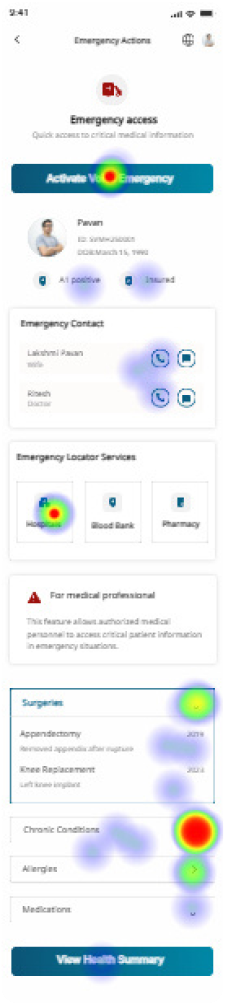
HEATMAP
Once the user scans the QR code, the patient’s emergency data appears instantly this is what is been tested
10 Total Participant
90% Success Rate
7% Mis click
3% Drop Off
Let's build something remarkable
+91-8658554107