
6
EMPATHY MAPS
Mapping empathy
across tiers.
Understanding the lived experience of each role in the cooperative banking hierarchy - from grassroots data entry to state-level validation - to design systems that truly serve their needs.

PACS Branch Operator
Branch Officer · PACS Maker Level
GOALS & MOTIVATION
Accurately submit daily PACS data without errors or delays
Quickly correct mistakes without relying on phone calls
Use a simpler, consistent form version every day
PAIN POINTS
Manually enters data in Excel - error-prone and time-consuming
Sends files over email or WhatsApp with no confirmation
Stressed about mistakes and confused by frequent form changes
Data Accuracy
58
Process Efficiency
43
Tech Comfort
32

District Administrator
CCB Officer · District Consolidation
GOALS & MOTIVATION
Have one unified place to see all branch submissions at a glance
Eliminate copy-pasting and manual consolidation of Excel files
Quickly detect and flag wrong figures before forwarding upward
PAIN POINTS
Collects data from 50+ branches - each sending separate files
Frustrated by repetitive manual consolidation of Excel sheets
Anxious that errors from branches slip through undetected
Data Accuracy
71
Process Efficiency
47
Tech Comfort
57

OSCB State Auditor
Regional Supervisor · OSCB Head Office
GOALS & MOTIVATION
Validate state-wide master datasets with confidence and speed
Get a clear view of which districts have submitted and which haven't
Ensure no wrong figures reach final state-level reporting
PAIN POINTS
Overloaded when forms are updated without any system support
Anxious about errors slipping through from district-level data
Frustrated by repetitive and unstructured work across districts
Data Accuracy
76
Process Efficiency
57
Tech Comfort
41
Three roles of one system.
The OSCB reporting ecosystem works only when data flows accurately through every tier - from the branch officer who enters it, to the CCB manager who consolidates it, to the HQ analyst who acts on it.
7
MOSCOW PRIORITIZATION
Four priorities,
one MVP scope.
A structured MoSCoW analysis of the reporting platform's feature set - separating critical blockers from enhancements, so the team can ship a compliant, usable MVP without over-engineering phase one.
8
INFORMATION ARCHITECTURE
Four entities,
one data trail.
Every reporting cycle flows through four linked entities. A scheme defines the structure, a form instance captures the data, an approval log tracks accountability, and a consolidated report delivers the final picture upward.


9
INFORMATION ARCHITECTURE

Five views,
one platform.
A single SSO entry routes each user to their role-specific view - from rural PACS data entry to state-level HQ dashboards and IT operations. Every screen is purpose-built; no clutter, no confusion.


10
DESIGN SYSTEM
Visual Token Specification

BUTTONS
In a design system, buttons serve as interactive atoms-the essential building blocks that guide users to take action. They communicate hierarchy, intent, and state while ensuring visual consistency across every touchpoint of the product.
Button Variants
Five button variants cover all use cases: Primary for main actions, Dark for emphasis, Danger for destructive actions, Neutral for secondary actions, and Ghost for tertiary/text links.

Button States
Each button variant supports 6 interaction states: Default, Hover, Focused, Pressed, Disabled, and Processing. Shown here with the Primary variant.
Processing
Disabled
Pressed
Focused
Hover
Default
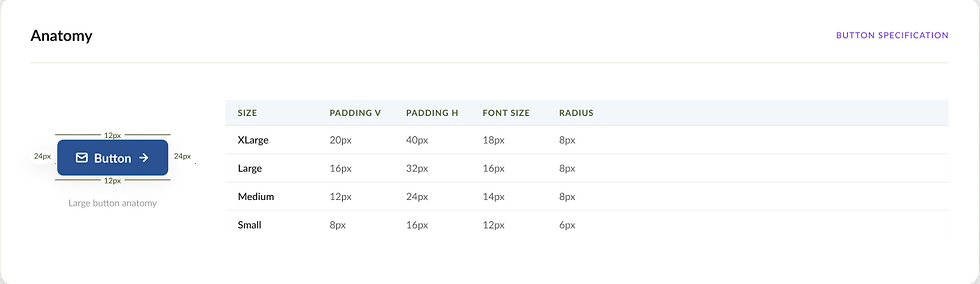
Anatomy
BUTTON SPECIFICATION
Form Inputs
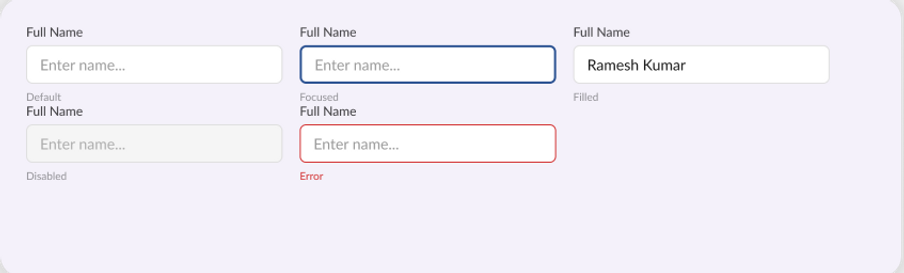
Text Input
Standard single-line text input. Used for names, email addresses, account numbers, and other short-form data entry across all forms.
Dropdown / Select
Selection input for predefined options. Used for branch selection, user roles, cooperative types, status filters, and other enumerated values.

Let's build something remarkable
+91-8658554107